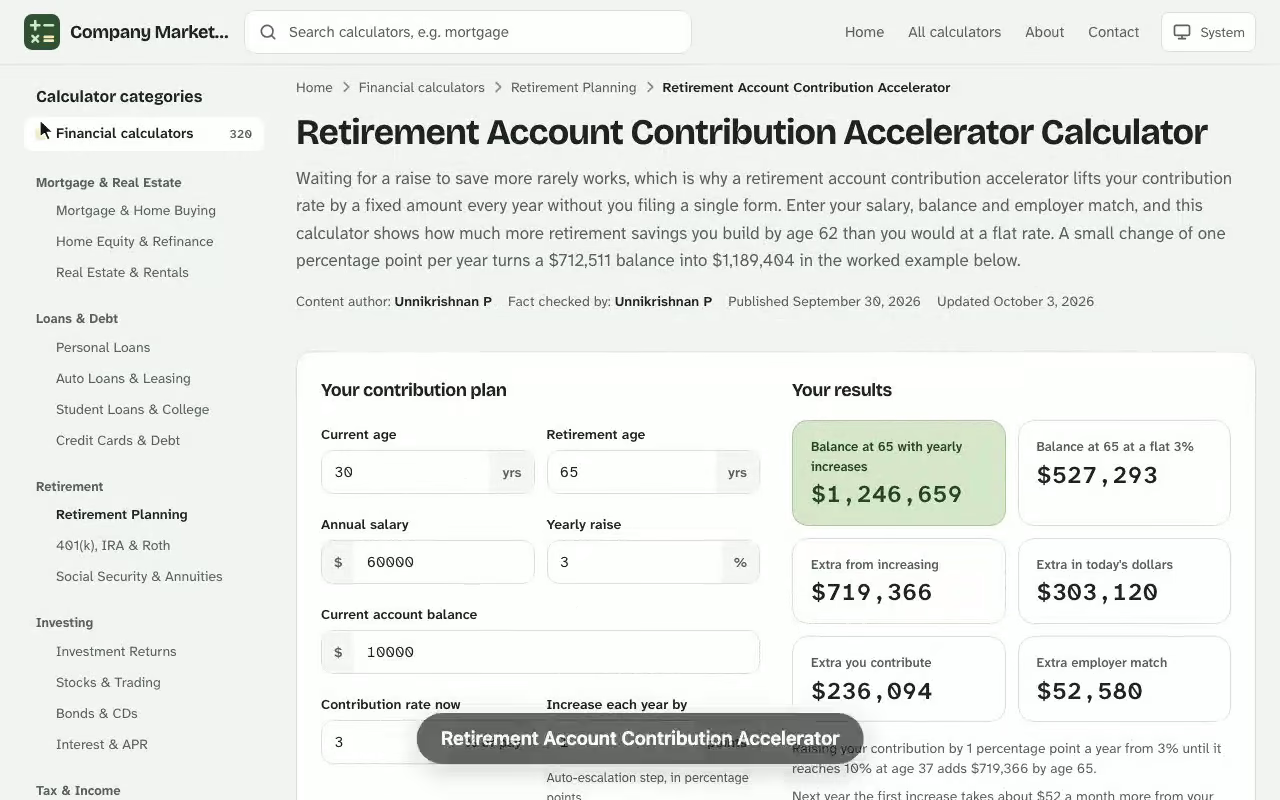
Retirement Account Contribution Accelerator. Waiting for a raise to save more rarely works, which is why a retirement account contribution accelerator lifts your contribution rate by a fixed amount every year without you filing a single form. Enter your salary, balance and employer match, and this calculator shows how much more retirement savings you build by age 62 than you would at a flat rate. A small change of one percentage point per year turns a $712,511 balance into $1,189,404 in the worked example below. Try the life expectancy calculator online to run your own numbers — everything is calculated in your browser and nothing you enter is stored or sent anywhere.
Your results
Balance with yearly increases
–
Balance at a flat rate
–
Extra from increasing
–
Extra in today's dollars
–
Extra you contribute
–
Extra employer match
–
Flat rate vs yearly increases
Your contribution rate and contributions each year under both plans, and the balance at the end of each year.
Age
Salary
Rate
You, flat
You, increasing
Balance, flat
Balance, increasing
Results are estimates for educational purposes and are not financial, tax or legal advice.
How a Retirement Account Contribution Accelerator Works
A contribution accelerator is a payroll setting that raises the share of pay you defer on a schedule, such as one percentage point each January until you reach a ceiling you picked. Many plans offer it as an automatic election, and if yours does not, you can simply raise the percentage by hand each year. Either way, the arithmetic is the same: a higher contribution rate in later years, applied to a salary that is also growing, feeds a balance that compounds for longer. Try the free retirement savings longevity calculator to run your own numbers — everything is calculated in your browser and nothing you enter is stored or sent anywhere.
The calculator runs two parallel projections from the same starting point. The first holds your rate flat. The second adds your annual step to your 401(k) deferral until it hits the cap. Comparing them isolates the value of the habit itself, separate from how much you earn or how the market performs, because both runs share the same salary growth, return and employer match.
Inputs for the Contribution Accelerator Calculator
You need nothing more than a recent pay statement and your plan summary. Each field below maps to something printed on one or the other: Next, open the free two-spouse retirement planner and enter your own details to see an estimate in seconds.
Current age and retirement age set how many years of contributions the projection covers.
Gross pay is your yearly annual income before taxes, including base pay and, if your plan counts them, bonuses or overtime in your plan's definition of compensation.
Expected salary increase grows that figure every year.
Current balance is what your 401(k) account already holds.
Rate of return is the yearly growth you assume on the investment mix.
Pay period chooses weekly, biweekly, semimonthly or monthly deposits.
Current contribution is your percentage of pay today, while the annual increase and maximum rate define the accelerator.
Employer match and its limit describe the match formula in your plan provisions.
Do not worry about being exact on the return. A conservative figure keeps the comparison honest, and the gap between the two projections barely moves when you change it by a point or two.
Retirement Contribution Formula Behind the Projection
For each year y, the salary, the rate and the match are worked out first, then deposits are compounded period by period.
Here S is gross pay, g the salary increase, c the contribution rate (starting at c1, rising by a each year up to cmax), m the match percentage and L the share of pay the employer will match. Each pay period then updates the balance with \(n\) deposits a year:
With a flat rate, a is zero. The difference between the two final balances is the value of increasing your contributions on a schedule, measured in extra retirement savings.
Worked Example: A 34-Year-Old's Retirement Savings Plan
Take a 34-year-old earning $78,400 who expects 2.5% raises, holds $18,250 in her 401(k) today, assumes a 6.5% return and is paid 26 times a year. She contributes 5% now, and her employer matches 50% of the first 6% of pay. The accelerator adds one point each year up to 12%, and she plans to stop at 62.
Year
Salary
Rate
Her deposits
Employer match
Balance, accelerator
Balance, flat 5%
1
$78,400
5%
$3,920
$1,960
$25,542
$25,542
3
$82,369
7%
$5,766
$2,471
$45,546
$42,094
5
$86,539
9%
$7,789
$2,596
$72,802
$61,599
8
$93,193
12%
$11,183
$2,796
$130,445
$97,381
15
$110,777
12%
$13,293
$3,323
$341,345
$221,332
28
$152,708
12%
$18,325
$4,581
$1,189,404
$712,511
At age 62 the flat 5% path holds $712,511 and the accelerated path holds $1,189,404, a difference of $476,893. Reading the year-by-year rows is the quickest way to see the lag: the two paths barely differ in year 1, yet by year 8 the accelerated balance is already $33,064 ahead.
Investment growth becomes the largest slice of the accelerated balance after roughly year 15.
Where the Extra $476,893 Comes From
Only part of the gap is money she paid in. She deposits $195,666 more over 28 years, her employer adds $15,233 more in match, and the remaining $265,994 is growth on those larger deposits. Because most of the difference is earned rather than contributed, starting the climb early matters far more than reaching the cap quickly.
Most of the $476,893 gap is growth on the larger deposits, not the deposits themselves.
What One Step Costs Your Paycheck
The step from 5% to 6% in year 2 raises each deposit by about $30.91 before tax, from $154.54 to $185.45 per check on her new salary. At a 22% marginal federal rate, her take-home pay falls by roughly $24.11 per paycheck, because the deferral lowers taxable wages. That is a modest cut, and her 2.5% raise adds about $75 of gross pay to each check, more than covering the step.
Employer Match Formula and Your 401(k) Calculator Results
The employer match is the one place where saving more can produce an immediate, guaranteed return. In this example the match formula is 50% of the first 6% of pay, so the employer contribution stops growing once her rate reaches 6%, which explains why the match column in the table rises slowly after year 3. Raising your own deferral past the matched level still helps, but the employer contributes nothing extra for it.
Check your plan summary for the exact formula before you enter it. Some plans use a tiered match, such as 100% on the first 3% and 50% on the next 3%, and others cap the total match at a dollar amount. Plans can also add non-elective or profit sharing deposits that do not depend on what you defer. A good 401(k) calculator lets you model the match separately from those extras, and treats automatic contributions from your employer as additional money, not as part of your own rate.
Pre-Tax, Roth and After-Tax Contributions in a Retirement Plan
How you contribute changes what the balance means after taxes, even though the projection itself looks identical. The table summarises the three common treatments:
Type
Tax today
Tax at withdrawal
Typical use
Pre-tax
Lowers taxable pay
Taxed as ordinary income
Higher earners now
Roth
No deduction
Qualified withdrawals tax-free
Lower bracket now
After-tax (non-Roth)
No deduction
Earnings taxed
Plans allowing extra savings
Choosing a Pre-Tax Basis or a Roth Basis
Contributions made on a pre-tax basis are tax-deferred, so the balance shown is partly owed to the IRS later. A Roth deferral is made after tax, so $1 of Roth balance is worth more than $1 of pre-tax balance. If you contribute on a Roth basis, consider entering a slightly lower return or comparing results at an assumed future tax rate. A financial professional can help you choose when you are unsure, and your plan's human resources office can confirm which options exist.
After-Tax Contributions and Mandatory Contributions
Some plans let you add after-tax contributions above the normal limit, and a few require mandatory contributions as a condition of participating. Neither is part of the accelerator's yearly step. Treat them as separate inputs, and keep them out of your elective rate so the projection does not double count them.
Catch-Up Contributions and IRS Limits for 401(k), 403(b) and 457 Plans
Raising your rate each year only works until you hit the ceiling the law allows. For 2026, the IRS limits an employee's elective deferral to a 401(k), 403(b) or governmental 457 plan to $24,500. Savers who reach age 50 can add an extra $8,000 in catch-up contributions, and under SECURE 2.0 those aged 60 to 63 can add $11,250 instead. A 457(b) can also offer a special three-year catch-up near retirement age. An IRA has its own, much lower limit, so it never uses up your workplace allowance.
These contribution limits are worth keeping in view when you set the maximum rate. At a salary of $152,708, a 12% rate is $18,325, comfortably inside the cap, so the example never collides with it. A higher earner who sets the cap at 20% could hit the limit well before retirement, and the calculator's projection would overstate what the plan actually accepts. Cap your maximum rate so the dollar amount stays under the limit for your plan type.
Raising the maximum contribution rate moves the result more than speeding up the yearly step.
Testing a 403(b) Contribution Step in a Retirement Savings Calculator
A hospital nurse, 41, is staring at an enrollment screen that asks whether she wants the plan's automatic yearly increase. Before she clicks yes, she opens the calculator with numbers from her latest pay statement: $64,850 in gross pay, a $47,320 balance in her 403(b), 3% raises, a 6% return, 24 pay periods and retirement at 67. Her current rate is 4%, and the employer matches 100% of the first 3%.
She enters a 1-point yearly step and a 10% ceiling. The contribution accelerator comparison returns $606,256 at a flat 4% and $873,591 with the step, a gap of $267,335. The match is identical in both runs, because 4% already clears the 3% the employer matches, so every extra dollar is her own money plus its growth.
Measure
Value
Per-check deposit, year 1
$108.08
Per-check deposit, year 2 (5%)
$139.16
Year the 10% ceiling is reached
Year 7
Final-year deposit at 10%
$13,578
See how the Retirement Account Contribution Accelerator works: change the inputs and the balance at 48 with yearly increases updates instantly. Enter your own numbers in the calculator above.
She checks that last figure against the 2026 elective deferral limit of $24,500. At $13,578 she sits well below it, so the ceiling is not the constraint. She then reruns the projection with a 12% ceiling and watches the balance climb to $941,946, another $68,355, with a final-year deposit of $16,294, still inside the limit. The year-2 step costs her $27.83 more per check before tax, which her 3% raise covers.
The decision follows from those two runs: she accepts the automatic increase, sets the ceiling at 12%, and puts a reminder on her calendar to revisit it at 50, when catch-up contributions become available.
Reading Your Retirement Savings Plan Results
The result panel reports the projected balance at retirement for both paths and the dollar difference. Use it to answer three practical questions.
Is the step affordable? Compare the per-check cost with your next raise.
Is the cap realistic? A 12% ceiling is easier to keep than 20%.
Is the target on track? Pair the retirement balance with a retirement planner or nest egg estimate to see how long your retirement savings last after inflation and withdrawals.
Remember that the figures are in future dollars. $1,189,404 in 28 years will buy less than it does today, so use the gap between the two paths to judge the accelerator rather than to promise a lifestyle. Income from a pension or Social Security lowers how much of the balance you must replace, and a traditional IRA or Roth IRA can take the same yearly step-up if your workplace plan reaches its ceiling. For a secure retirement, treat that projection as one input among several.
Contribution Accelerator vs. Contribution Maximizer and Other Savings Calculator Tools
A contribution maximizer solves a different problem: given what you have already put in this year, it suggests the amount per paycheck needed to reach the IRS limit by December. The accelerator looks across decades instead, comparing a flat rate with a rising one. Use the maximizer for a one-year top-up, and the accelerator for long-term habit design.
Other tools answer related questions. A contribution rate calculator that compares two rates shows the effect of a one-time change, a savings calculator models a single deposit stream, and a full retirement planner checks whether the result funds your spending. Results from unaffiliated calculators differ because each makes its own assumptions about raises, compounding and matches, so compare tools by running the same inputs through each. Treat this calculator as a tool for testing assumptions: the step, return and match are yours to change, while the rules of your qualified retirement plan decide what is actually allowed.
What is a retirement account contribution accelerator?
It is a payroll feature that raises the percentage of pay you contribute by a set amount each year, usually until you reach a ceiling you choose. If your plan does not offer it, you can raise your rate by hand on the same schedule.
How much more can I save by increasing my contribution each year?
It depends on your salary, return and time horizon, but the gain is often large because the later, higher deposits compound too. Run the calculator with a flat rate and with your yearly increase to see the exact difference for your numbers.
Does the employer match change when my contribution rate rises?
Only up to the match limit. If your employer matches 50% of the first 6% of pay, raising your rate past 6% adds your own money but no extra match.
Will increasing my contribution reduce my take-home pay?
Yes, but by less than the full amount for pre-tax contributions, because the deferral lowers your taxable wages. A one-point increase on a $72,000 salary is about $720 a year before tax, or roughly $28 per biweekly paycheck.
What are the 2026 contribution limits?
For 2026 the IRS limits employee elective deferrals to a 401(k), 403(b) or governmental 457 plan to $24,500, with an extra $8,000 catch-up at age 50 and $11,250 at ages 60 to 63 under SECURE 2.0. Set your maximum rate so the dollar amount stays under the limit.
Should I use pre-tax or Roth contributions with the accelerator?
The projection works the same either way, but a pre-tax balance is taxed when you withdraw it and a Roth balance is not. Compare the two with your expected future tax rate, and ask your plan administrator which options your plan allows.
What rate of return should I enter?
Use a conservative long-term figure, since the gap between the flat and accelerated projections changes little when you move the return by a point or two. The result is an estimate, not a guarantee.