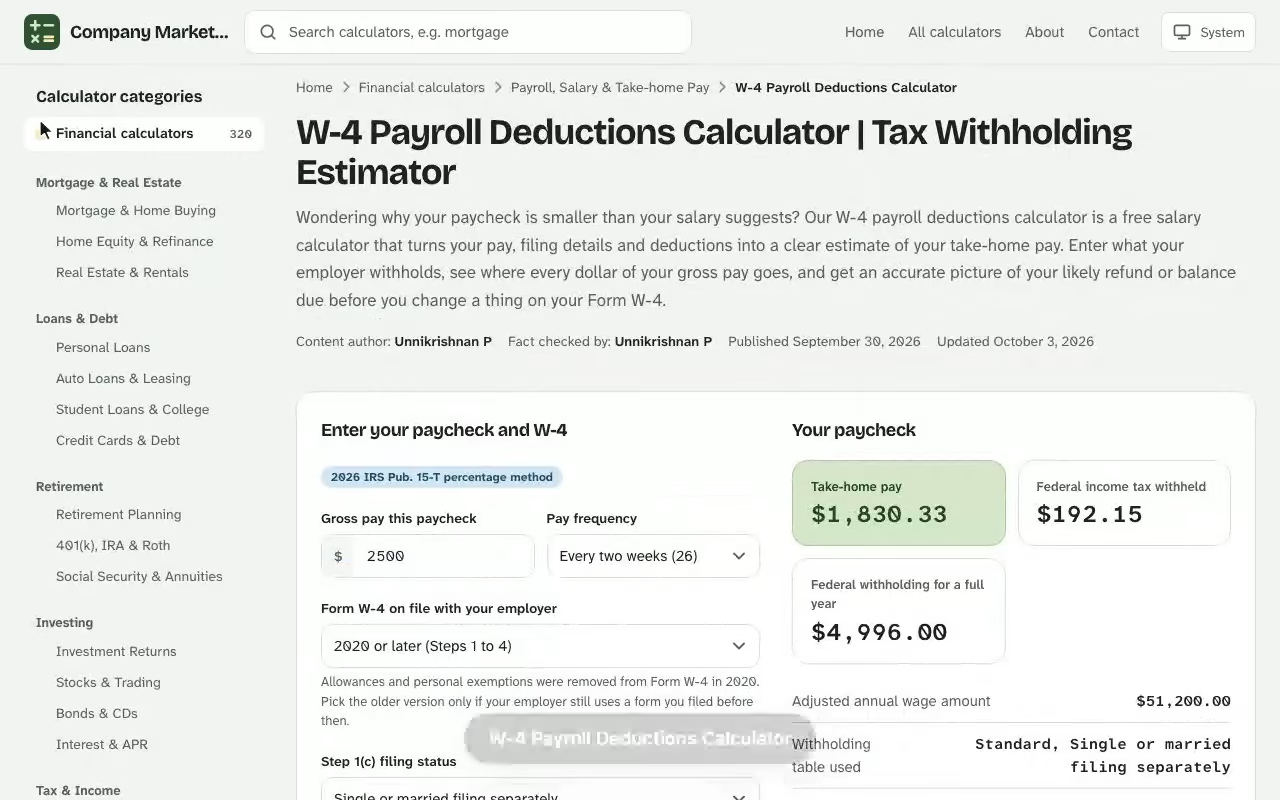
W-4 Payroll Deductions Calculator. Wondering why your paycheck is smaller than your salary suggests? Our W-4 payroll deductions calculator is a free salary calculator that turns your pay, filing details and deductions into a clear estimate of your take-home pay. Enter what your employer withholds, see where every dollar of your gross pay goes, and get an accurate picture of your likely refund or balance due before you change a thing on your Form W-4. Next, open the salary increase calculator and enter your own details to see an estimate in seconds.
Your paycheck
Take-home pay
–
Federal income tax withheld
–
Federal withholding for a full year
–
Adjusted annual wage amount–
Withholding table used–
Rate on your next dollar of pay–
Rounded to the nearest dollar–
Withholding worksheet
Each line of Worksheet 1A from IRS Publication 15-T (2026), the method automated payroll systems use, filled in with your numbers.
Line
What it is
Amount
Paycheck deductions
Every deduction from this paycheck, and what it adds up to if each check in the year is the same.
Item
This paycheck
Full year
Results are estimates for educational purposes and are not financial, tax or legal advice.
W-4 Payroll Deductions Calculator: What It Estimates
A payroll deductions calculator works backward from the numbers on your pay stub. You supply your pay, how often you are paid and the answers you gave on your W-4 form, and the tool estimates how much federal income tax, Social Security and Medicare come out of each paycheck. What is left is your net pay, the amount that actually reaches your bank account. If you want to see how the figures change, the free civilian to military pay calculator gives you an instant result you can adjust as you go.
The calculator is built around the same inputs your employer's payroll system uses: your gross pay per pay period, your filing status, the credits and extra amounts you claimed, and the pre-tax deductions that lower your taxable wages. Because it follows the withholding logic rather than the final tax return, it estimates what your payroll department will take, not what you will ultimately owe the IRS in April.
Use it in three situations:
New job: estimate your take-home before the first paycheck arrives and decide how to complete your W-4.
Raise or bonus: check how a higher salary or one-off payment changes your tax withholding and net income.
Surprise at tax time: find out why you owe or why your refund shrank, then fix the withholding going forward.
How to Use This W-4 Withholding Calculator
Gather your latest paystubs first. The most accurate results come from numbers you can copy straight off a real paycheck stub rather than from memory. Then work through the fields in order. The payroll deductions calculator is free to use with no sign-up, and works on desktop and mobile.
Select your pay frequency: weekly, bi-weekly, semi-monthly or monthly.
Enter your gross pay for one pay period, or your annual salary if you prefer to start from the yearly figure.
Choose your filing status exactly as it appears on your W-4 form.
Add the dependents amount and any tax credits from Step 3, plus other income or deductions from Step 4.
Enter pre-tax benefit deductions such as health insurance premiums and 401(k) contributions.
Press the Calculate button to see your federal withholding, FICA taxes and net pay.
What you need before you start
Keep your most recent pay stub open, along with last year's tax return if you want to estimate other income, interest or dividends. If you have a spouse who works, bring their paystubs too, because two incomes push a household into higher tax brackets faster than either income does alone.
Entering pay frequency and gross pay
Withholding is calculated per period, then repeated across the year, so the pay frequency you pick changes the size of each check but not the annual total. A salary of the same size withholds about the same yearly federal tax whether you are paid weekly or monthly, with small differences caused by rounding in the payroll tables.
The Formula Behind Your Net Pay
Every gross-to-net calculation follows the same order: subtract the pre-tax items first, then taxes, then any post-tax items. In formula form, your net income for one paycheck is:
The federal piece starts from your annual taxable wages. The calculator annualizes one paycheck, subtracts the standard deduction, applies the tax brackets, subtracts your credits and divides by the number of pay periods:
$$\text{Federal withholding} = \frac{\text{Tax on annual taxable wages} - \text{Credits}}{\text{Pay periods per year}} + \text{Additional withholding}$$
Social Security and Medicare are simple percentages of your wages after health premiums are removed. For 2026 the Social Security rate is \(6.2\%\) up to a wage base of $184,500, and the Medicare rate is \(1.45\%\) with no cap. Contributions to a 401(k) reduce income tax but not these payroll taxes.
Worked Example: A Bi-Weekly Paycheck for a Single Filer
Take an employee earning an annual salary of $83,640, paid bi-weekly (26 pay periods), filing as single with one qualifying child. They contribute 6% of pay to a pre-tax 401(k) and pay $112.40 per paycheck for pre-tax health coverage. Nothing is entered under other income, extra deductions or additional withholding.
Line
Per paycheck
Per year
Gross pay
$3,216.92
$83,640.00
401(k) contribution (6%)
$193.02
$5,018.40
Health insurance premiums
$112.40
$2,922.40
Federal income tax withholding
$216.30
$5,623.82
Social Security (6.2%)
$192.48
$5,004.51
Medicare (1.45%)
$45.02
$1,170.40
Net pay
$2,457.71
$63,900.48
Figures are rounded to the cent, so a column may differ from its parts by one cent.
From gross pay to take-home pay: the worked example's $3,216.92 paycheck after each deduction.
Federal income tax withholding, step by step
Start with $83,640, subtract $5,018.40 for the 401(k) and $2,922.40 for the premiums, then subtract the $16,100 standard deduction for a single filer. That leaves $59,599.20 of taxable income. The first $12,400 is taxed at 10% ($1,240.00), the slice from $12,400 to $50,400 at 12% ($4,560.00) and the remaining $9,199.20 at 22% ($2,023.82), for $7,823.82 before credits. The $2,200 child credit brings it to $5,623.82, or $216.30 per bi-weekly paycheck.
FICA: Social Security and Medicare
FICA is calculated on $3,104.52 per paycheck, which is gross pay minus the health premium. The 401(k) is left in because retirement contributions are still subject to these taxes. That produces $192.48 for Social Security and $45.02 for Medicare, a combined 7.65% of that base.
How Form W-4 Steps Change Your Federal Withholding
The current form W-4 has five steps, and each step feeds a specific field in the calculator. Only Step 1 and Step 5 are required; Steps 2 to 4 are optional adjustments that fine-tune the amount your employer withholds. You can download a completed form once you have settled on the numbers.
Filing status and head of household
Your filing status selects the standard deduction and the bracket widths used in the formula. Single, married filing jointly and head of household each produce a different result for the same salary. Head of household applies only if you are unmarried and pay more than half the cost of keeping up a home for a qualifying person, and it withholds less than single because of its larger deduction.
Multiple jobs, a spouse and a side job
Withholding tables assume each job is your only one. When you hold multiple jobs, or your spouse works too, each employer applies the lower brackets as if no other pay existed, so too little tax is taken in total. Step 2 corrects this: tick the box on the higher-paying job, or enter the combined figures in the calculator. A side job that pays you as a contractor is better handled with Step 4(c) or estimated payments.
Dependents and tax credits
Step 3 multiplies qualifying children and other dependents by their credit amounts and lowers your withholding by the total. In our worked example, one child removes $2,200 of tax, which is why the withholding falls from about $301 to $216 per paycheck. Because credits reduce tax dollar for dollar, they matter more than deductions of the same size.
How net pay moves when you change your 401(k) rate or the credits claimed on your W-4.
Extra withholding and exemptions
Step 4(c) adds a fixed amount to every paycheck. It is the simplest lever when you keep owing at filing time. Claiming that you are exempt from federal withholding is only allowed if you had no tax liability last year and expect none this year, and it expires every February 15 unless you file a new form.
Pre-Tax vs Post-Tax Deductions on Your Paycheck
Not every line on a paycheck stub is treated the same way. Pre-tax items come out before income tax is figured, so they shrink your taxable wages. Post-tax items come out afterward and do not change your tax at all.
Pre-tax deductions: traditional 401(k) and 403(b) contributions, health insurance premiums, flexible spending accounts and commuter benefits.
Post-tax deductions: Roth 401(k) contributions, union dues, disability premiums paid with after-tax money and charitable payroll giving.
Benefit deductions vary by plan, so check which ones your employer treats as voluntary deductions.
Wage garnishments for child support or a court order are taken after tax and must be entered as post-tax deductions.
See how the W-4 Payroll Deductions Calculator works: change the inputs and the take-home pay updates instantly. Enter your own numbers in the calculator above.
The calculator treats the two groups separately because the order matters. A $200 pre-tax contribution in the 22% bracket saves $44 of federal income tax, while a $200 post-tax deduction saves nothing.
Pay Frequency: Bi-Weekly, Semi-Monthly and More
Your pay frequency sets how many paychecks you get and therefore how the annual withholding is divided. A bi-weekly schedule produces 26 checks, while semi-monthly pay produces 24, so each semi-monthly check is larger.
Weekly
52 pay periods; smaller checks, most frequent withholding.
Bi-weekly
26 pay periods; paid every other week.
Semi-monthly
24 pay periods; usually paid on the 15th and the last day.
Monthly
12 pay periods; the largest individual check.
Bi-weekly pay produces 27 checks in some years, because 26 pay periods do not fit evenly into 12 months. If your check date falls in such a year, enter 27 in the calculator so the annualization stays honest.
A Head-of-Household Paycheck Check with a Salary Calculator
Marisol Quintero started a clinic job in February at $58,925 a year, paid semi-monthly, and her first pay stub shows $38.10 of federal withholding. She files as head of household with one daughter, so before the second check she opens the calculator to see whether that figure is high enough.
She enters 24 pay periods, a gross of $2,455.21, head of household, one qualifying child worth $2,200 in Step 3, and her $64.30 pre-tax health premium. The calculator subtracts $1,543.20 of premiums and the $24,150 head-of-household standard deduction from her pay, leaving $33,231.80 of taxable income. Tax on that is $3,633.82 before the credit and $1,433.82 after it, so her federal withholding should be $59.74 per paycheck, not $38.10.
Over 24 paychecks the stub's pace withholds $914.40, which leaves a projected balance due of $519.42. The result sits below the IRS's $1,000 threshold for an underpayment penalty, so she would not be fined, but a $519 bill in April is still the exact surprise she wants to avoid.
She changes one input and reruns the estimate: $22 in Step 4(c) as additional withholding on top of the current $38.10. Withholding becomes $60.10 per period, or $1,442.40 for the year, which beats her $1,433.82 liability by $8.58 and flips the outcome to a small refund. Her net pay moves from $2,169.90 to $2,147.90 per paycheck, a $22.00 drop she can absorb, and she submits the new form to payroll that afternoon.
Standard Deduction vs Itemized Deductions
Payroll withholding assumes you will claim the standard deduction, which is $16,100 for a single filer in 2026. That is right for most people. If you plan to take itemized deductions that total more, such as mortgage interest, state and local taxes and charitable gifts, enter the excess in Step 4(b) of the form so your employer withholds less.
Include only the amount above the standard deduction. If your itemized list adds up to $21,300, the number to enter is $5,200. Putting the full $21,300 would double count the deduction already built into the withholding method and leave you with a balance due.
State Tax, Local Taxes and Your Take-Home Pay
The federal W-4 controls only federal withholding. Your state tax is governed by a separate state form in many places, and nine states levy no wage income tax at all. When your state or city taxes wages, the calculator adds state income tax and any local taxes to the deductions list, which can move your take home pay by several percent.
Employers separately pay their own share of Social Security and Medicare, plus unemployment taxes such as FUTA. The calculator leaves these employer-paid costs out because they never reduce your net pay.
Bonus, Hourly Pay and Other Paycheck Changes
A bonus is not taxed at a higher rate in the end, but it is usually withheld at a flat 22% federal rate, which can feel steep. If the amount is withheld at more than your real rate, the difference comes back as a refund. Enter the bonus as its own pay period to see the effect on that one check.
Hourly workers should multiply their rate by expected hours, including overtime, to find gross pay for the period and then add up wages across the year. Irregular hours make each paycheck vary, so run the calculator with a low, typical and high week to see the range of your earnings after tax.
Tax Withholding Estimator vs W-4 Calculator: Which Should You Use?
The IRS runs its own tax withholding estimator, and it is worth using when your situation is complicated. It takes about 25 minutes, asks for your latest tax return and can produce a pre-filled form for your employer. A quick w-4 calculator like this one answers a narrower question in a minute: how much will land in your account per paycheck?
Use the quick W-4 payroll deductions calculator when you want to compare scenarios, such as a new 401(k) rate or a different filing status. Use the IRS estimator when you have self-employment income, a pension, investments or large adjustments. Both only estimate your tax liability, and neither replaces advice from a tax professional.
When to Update Your W-4 After a Life Change
Check your withholdings every January and whenever a life change shifts your income or credits. Typical triggers include:
A new job or a second paid job.
Marriage, divorce or separation.
The birth or adoption of a child.
A home purchase that adds mortgage interest.
A large change in pay, other income or retirement contributions.
You can submit a new form at any point in the year. Your employer normally applies it within a few pay periods, and because the tax is spread over fewer remaining paychecks, a late-year change has to be bigger to have the same annual effect.
Common Withholding Mistakes and Penalty Risks
Most federal withholding errors come from stale forms or double counting. Review this list before you trust any estimate:
Leaving an old W-4 in place after getting married or having a child.
Claiming credits on both jobs, or on both spouses' forms, so they are counted twice.
Forgetting interest, dividends and freelance income that no one withholds on.
Setting withholding to zero and facing an underpayment penalty when you file.
Ignoring a change in self-employment earnings during the year.
As a rule of thumb, you generally avoid a penalty if your withholding covers at least 90% of this year's tax or 100% of last year's, and 110% of last year's if your adjusted gross income was above $150,000. If your check keeps coming up short, add additional withholding rather than adjusting everything else.
How This Payroll Deductions Calculator Compares with Other Paycheck Tools
This tool sits between a general salary paycheck calculator and a federal paycheck calculator, which sound alike but answer different questions. The first estimates everything between your salary and your deposit, including your state, city and benefit lines. The second isolates the federal layer, which is the only part your W-4 can change. Seeing both views side by side tells you whether a small paycheck is caused by a withholding choice you can adjust or by state tax and benefit costs you cannot.
When you compare outputs from any paycheck calculator, match the inputs first. Make sure each tool uses the same tax year, the same per-period gross amount and the same filing details, because a one-line difference in the number of dependents or in pre-tax benefits can move the answer by tens of dollars. Treat results as an estimate, not a promise.
Who should run the numbers
A W-2employee with one job and no other income gets a reliable answer from the calculator. Someone with a pension, two employers or income from investments should expect the estimate to be less exact and should check it against the IRS tool. Employers and payroll staff also use these tools to sanity-check a new hire's form before the first run.
Each dependent you list changes your credit amount, and each benefit you elect changes your taxable wages, so re-enter the premium and dependent fields in the calculator after open enrollment. Your benefits package can easily account for a third of the gap between gross and net.
How tax rates and brackets drive the calculator's result
The IRS publishes new tax rates and thresholds every year, and payroll systems load them in January, so the calculator's bracket table and tax year drive the answer. The standard deduction, bracket edges, child credit and Social Security wage base all change, which is why an estimate that was right in 2025 can be off in 2026 even though your pay and your form are identical. Each rate applies only to the slice of income inside its bracket, so a raise moves only the top dollars into a higher rate.
That is also why you should withhold a little extra through the Step 4(c) field only when the calculator's refund or balance due says you need to.
Reading the Results: Refund, Owe or Balance Due
The calculator compares what your employer will withhold across the year with a rough estimate of your income tax and shows one of two outcomes. If withholding is higher, you receive a tax refund. If it is lower, you owe a balance due when you file. Neither outcome is wrong by itself; a refund is simply an interest-free loan to the government, while a small balance due keeps more money in your hands during the year.
Aim for the result closest to zero if you want your take-home as high as possible, or aim for a modest refund if you prefer a safety margin. Rerun the estimate after any raise, and keep an eye on the credits and adjustments you enter, since they are where most inaccuracy hides. The resulting estimate is only as accurate as the paystubs you entered, so correct anything that looks off.
Finally, compare the net pay the calculator shows with your monthly budget before you submit a new form.
W-4 Payroll Deductions Calculator questions
How does a W-4 payroll deductions calculator work?
It annualizes your pay, subtracts pre-tax deductions and the standard deduction, applies the federal tax brackets, subtracts the credits you claimed on Form W-4 and divides by your pay periods. Social Security and Medicare are then taken from your wages and the remainder is your net pay.
Does updating my W-4 change my paycheck?
Yes. Your W-4 tells your employer how much federal income tax to withhold. Raising your withholding lowers each paycheck but typically increases your refund or lowers what you owe; lowering it increases take-home pay now but may leave a balance due.
Does this calculator include state tax withholding?
Only as a flat rate you enter yourself. State withholding rules vary and are set on separate state forms, so use your state's own estimator for an exact figure.
Can I claim head of household on my W-4?
Yes, if you qualify for head of household filing status you can choose it in Step 1. It uses a larger standard deduction and wider low-rate brackets, so it withholds less than single.
When should I check my withholding?
Check every January and after a life change such as a new job, marriage, divorce, the birth or adoption of a child, a home purchase or a major change in income. You can submit a new W-4 to your employer at any time.
Can I set my federal withholding to zero?
Only if you are exempt, which requires no tax liability last year and none expected this year. Otherwise withholding too little can leave a balance due and possibly an underpayment penalty.
Why is my take-home pay lower than my gross pay?
Pre-tax deductions such as 401(k) contributions and health premiums, federal income tax, Social Security, Medicare, state taxes and any post-tax deductions all come out before your net pay is deposited.
How accurate is the estimate?
It is a good guide for a single job with straightforward pay, but your payroll provider's tables, rounding and any state or local rules can differ slightly. Compare it with a real pay stub and the IRS Tax Withholding Estimator for complex situations.