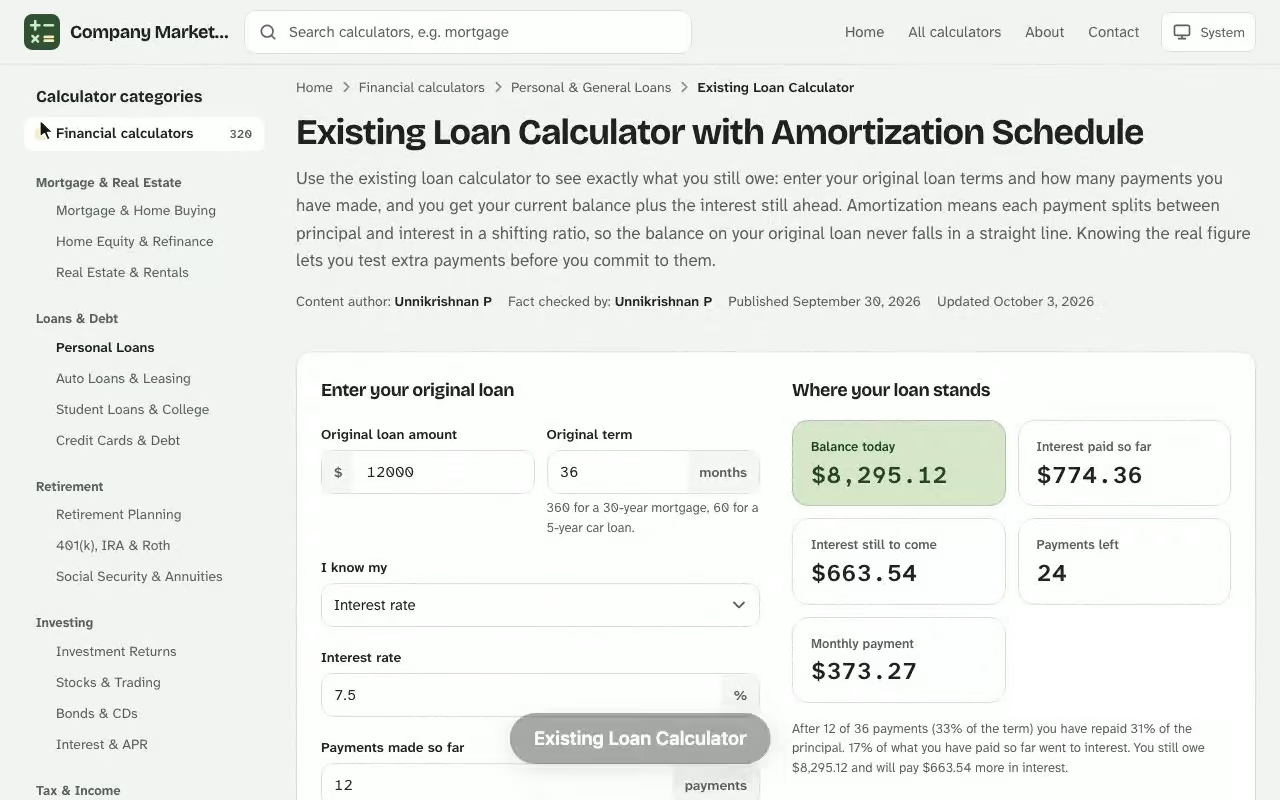
Existing Loan Calculator. Use the existing loan calculator to see exactly what you still owe: enter your original loan terms and how many payments you have made, and you get your current balance plus the interest still ahead. Amortization means each payment splits between principal and interest in a shifting ratio, so the balance on your original loan never falls in a straight line. Knowing the real figure lets you test extra payments before you commit to them. Pair this with the free payment calculator for a fuller picture before you make a decision.
Where your loan stands
Balance today
–
Interest paid so far
–
Interest still to come
–
Payments left
–
Monthly payment
–
–
So far and still to come
So far
Still to come
Whole loan
To pay the loan off in full, ask your lender for a payoff quote: it adds the interest building up since your last payment.
Amortization schedule
Payments already made are marked as paid.
Results are estimates for educational purposes and are not financial, tax or legal advice.
How the Existing Loan Calculator Finds Your Remaining Balance
Banks and credit unions host an existing loan calculator so each borrower can check a loan that is already running, rather than one they have not signed yet. You supply the terms from your loan agreement, and the tool replays every month since loan origination to reach today's loan balance. It is one of the self-help tools lenders offer, and it returns the balance after your payments so far plus the interest still to come. Next, open the biweekly auto loan fees calculator and enter your own details to see an estimate in seconds.
Loan Amount, Interest Rate and Loan Term
Three inputs drive everything. The loan amount is the original sum you borrowed, the interest rate is the annual percentage your lender charges, and the loan term is the number of months you agreed to repay it. Add the month your first payment fell due and the count of payments you have made, and the calculator has what it needs.
Original loan amount, taken from your signing documents
Annual interest rate, as a fixed-rate figure
Loan term in months, never years, to avoid conversion slips
Number of payments completed since the first due date
Monthly Payments and Payment Frequency
Most consumer debt uses monthly payments, but some contracts allow a different payment frequency such as biweekly. If you paid the regular payments in full and on time, the scheduled amount is all you need. If some months were short or skipped, the balance will be higher than the schedule suggests, so enter the actual amounts paid. Paying only the minimum payments your contract demands keeps the loan on its original path, while an unpaid month lets interest pile onto the debt.
Loan Balance Formula and Amortization Schedule
The amortization math has two parts. First, the fixed payment that retires the debt over the full term: The deferred payment loan calculator online is free to use with no sign-up, and works on desktop and mobile.
$$M = P \times \frac{r(1+r)^{n}}{(1+r)^{n}-1}$$
Here \(P\) is the loan amount, \(r\) is the monthly rate (annual rate divided by 12) and \(n\) is the number of months. Second, the balance left after \(k\) payments:
$$B_{k} = P(1+r)^{k} - M \times \frac{(1+r)^{k}-1}{r}$$
Run the second formula for every month and you have a full amortization schedule, which is the same payment schedule a lender shows you in a statement.
Principal Balance and Total Interest
Each month, interest equals the principal balance times the monthly rate, and whatever is left of your payment reduces the balance. Early on, interest takes the larger share, which is why the first year barely dents the debt. Adding every interest line gives your total interest, the true price of borrowing beyond what you were lent.
Paying Off a Loan Month by Month
Because the interest portion shrinks while the payment stays level, the principal portion grows every month. That is the reason a loan feels slow to pay off at first and fast at the end. Reading the schedule row by row shows precisely when your payment flips to mostly principal.
The principal share of each payment grows as the balance falls.
Worked Example: Loan Balance After 19 Monthly Payments
Suppose you borrowed $23,750 at a 7.35% fixed rate over 60 months. The scheduled payment works out to $474.21. After 19 payments, the calculator reports an ending balance of $17,147.38. Over those months you have paid $2,407.37 of interest and $6,602.62 of principal, a total of $9,009.99 sent to the lender. The table shows how the split moves at key points in the loan.
Current loan balance after 19 payments on the example loan.
Month
Payment
Interest
Principal
Ending balance
1
$474.21
$145.47
$328.74
$23,421.26
12
$474.21
$122.63
$351.58
$19,669.47
19
$474.21
$107.28
$366.93
$17,147.38
36
$474.21
$67.14
$407.07
$10,554.15
48
$474.21
$36.19
$438.02
$5,470.38
At the scheduled pace, the full loan costs $4,702.70 in total interest, so you repay $28,452.70 in all. A final payment of $474.31 clears the last cent of rounding.
When Your Real Balance Differs From the Schedule
The table assumes all 19 payments were exactly $474.21 and landed on their due dates. A late payment adds a few days of extra interest, and a skipped payment adds a full month. If your records show a short month, change that one row in the calculator instead of the whole loan, because the following balances all shift. Compare the result with the figure on your latest lender statement; a gap of more than a few dollars usually means a fee, a late charge or a payment that was applied somewhere other than the principal.
Enter the dates and amounts from your own payment log into the calculator, and the month where its balance first departs from your statement is the month to ask the lender about.
Checking Your Loan Payoff Before a Trade-In
Dana Whitcombe wants to trade in a pickup and needs to know whether the dealer's offer covers what is still owed. The truck was financed at $31,480 for 72 months at 6.15%, and 26 payments are behind her. Her statement shows a different number from the one she expects, so she runs the figures herself instead of trusting a rounded estimate.
She enters the original amount, the rate, a 72-month term, the first payment date and 26 as the payments made. The tool computes a scheduled payment of $523.95, then replays each month of the amortization. The result: a remaining balance of $21,422.51, with $3,565.21 of interest already paid.
Item
Amount
Remaining balance after 26 payments
$21,422.51
Trade-in value (Kelley Blue Book, good condition)
$20,900.00
Shortfall at trade-in
$522.51
She reruns the calculator with 27 payments made and an extra $150 on that payment, so $673.95 in total. The balance falls to $20,858.35, which is $41.65 under the $20,900 value. Without the extra $150, the balance would sit at $21,008.35 after payment 27 and only slip below the trade-in value at payment 28 ($20,592.07).
Her decision is concrete: send $673.95 next month, confirm the payoff figure with the lender in writing, and only then visit the dealer.
Prepayment Calculator View: What Extra Payments Save
Once you know your balance, the same inputs work as a prepayment calculator. Add an extra payment to the principal each month and the schedule recomputes. Keeping the example above, an added $125 starting with payment 20 clears the debt in month 51 instead of month 60, and the total interest drops to $4,170.77. That is $531.93 of interest savings plus nine fewer payments.
An extra $125 from payment 20 ends the loan at payment 51 instead of 60.
Shorten Your Repayment Timeline
An extra payment goes straight to principal, so every later interest charge is calculated on a smaller balance. The effect compounds in your favor, and it is strongest when you start early. Check first that your lender applies the money to principal and does not charge a prepayment penalty.
Pick an extra amount your monthly cash flow can sustain
Run the figure through the calculator to see the new payoff month
Compare the lifetime savings against what you would earn elsewhere
Amortization Calculator vs Loan Balance Calculator
An amortization calculator usually starts from a brand-new loan and shows the whole schedule, while a loan balance calculator starts from a loan already underway and answers one question: what is owed today? A general loan calculator solves for the payment or the loan amount. Use the one that matches the question you actually have.
Calculator
Best for
Main result
Existing loan
A loan you are already repaying
Current balance and remaining interest
Amortization
A new loan or full schedule
Payment and interest per month
Prepayment
Extra payment planning
Interest saved and months removed
See how the Existing Loan Calculator works: change the inputs and the balance today updates instantly. Enter your own numbers in the calculator above.
Spreading Costs Across Mortgage, Auto and Student Loans
The calculator works the same for a mortgage, an auto loan or student loans; you only change the amount, rate and term. For federal student loans, take those figures from your servicer's notice, and use the smaller loan amount if scholarships reduced what you borrowed. A longer term means more of the total cost sits in the early years, and the interest column is what to show a tax preparer when you ask about the interest deduction.
Using Your Loan Payoff Result in a Budget
The payoff figure is more than a curiosity. Lenders quote it when you refinance or sell, and it tells you how much debt is left to carry. Compare the calculator's remaining balance and interest figures with your monthly budget before you borrow again, since a lower balance can improve your credit position when a lender reviews your debts. A sound strategy is to redirect any payment that ends, such as a finished car loan, into your next extra payment, and to rerun the calculator whenever your rate or payment changes. That ties your financial plan, your cash flow and your wider personal finance goals to what you really owe.
Existing Loan Calculator questions
How does an existing loan calculator work out my balance?
It builds the loan's amortization schedule from the amount, rate, term and first payment date, then reads off the ending balance after the number of payments you have made.
What do I need to enter?
The original loan amount, the interest rate, the loan term, the month and year of the first payment, and how many payments you have made. The original monthly payment is optional because it can be calculated.
Why is my balance higher than I expected?
Early payments are mostly interest, so principal drops slowly at first. A late, short or skipped payment also leaves a higher balance than the schedule shows.
What if I did not pay the scheduled amount every month?
Use the fields for payments made at a different amount. Enter that amount and how many of the first payments were made at it.
How do extra payments change the result?
An extra monthly, yearly or one-time payment goes to principal, so later interest is charged on a smaller balance and the payoff date moves earlier.
Can I use it for a mortgage, auto loan or student loan?
Yes. Any fixed-rate loan with equal monthly payments works the same way. Enter the terms from your loan agreement.
Will the result match my lender's payoff quote?
Not always. A payoff quote includes interest accrued to the payoff date and may include fees, so confirm the exact figure with your lender before sending money.