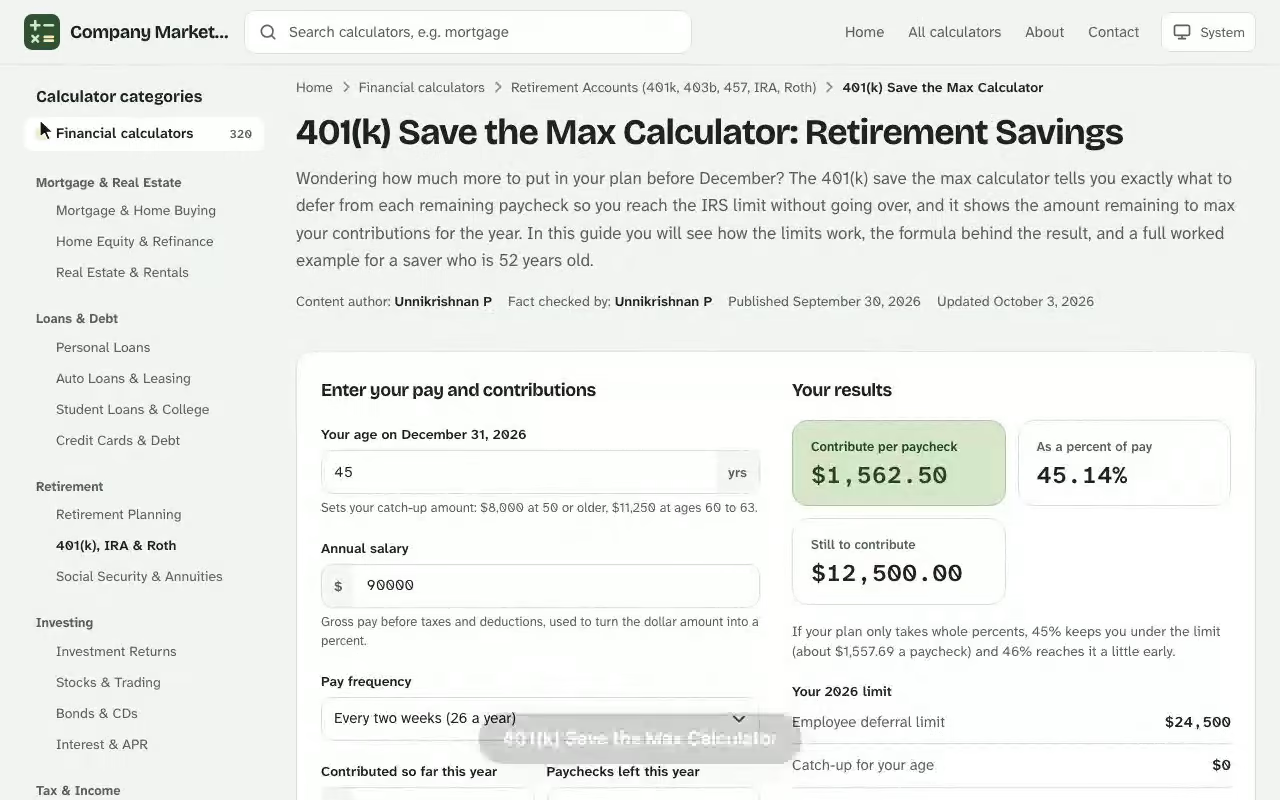
401(k) Save the Max Calculator. Wondering how much more to put in your plan before December? The 401(k) save the max calculator tells you exactly what to defer from each remaining paycheck so you reach the IRS limit without going over, and it shows the amount remaining to max your contributions for the year. In this guide you will see how the limits work, the formula behind the result, and a full worked example for a saver who is 52 years old. The 401k calculator online uses the same plain-English approach, so you can compare results side by side.
Your results
Contribute per paycheck
–
As a percent of pay
–
Still to contribute
–
Your 2026 limit
Employee deferral limit–
Catch-up for your age–
Your total limit–
Gross pay per paycheck–
Year-end total at your current rate–
If your 2025 Social Security wages from this employer were over $150,000, any catch-up amount must go in as Roth.
Paycheck-by-paycheck plan
Contributions from each remaining paycheck and your running total for the year.
Paycheck
Contribution
Year-to-date total
Room left
Results are estimates for educational purposes and are not financial, tax or legal advice.
How the 401(k) Save the Max Calculator Works
A 401k contribution maximizer answers one narrow question: given what you have already deferred this year, how much can you still contribute before you hit the annual limit? The tool compares your year-to-date total against the IRS limit that applies to your age, subtracts one from the other, and spreads the difference across the paychecks you have left. Whether your plan is a 401(k), a 403(b) or a governmental 457(b), the logic is the same, because each one is a retirement savings plan with an employee deferral cap. The free individual 401k contribution comparison is free to use with no sign-up, and works on desktop and mobile.
Spreading the remainder evenly matters. Many plans let you set a percentage of pay or a flat dollar amount per paycheck, and the calculator gives you both so you can type whichever your payroll portal asks for. Because you update it with real numbers from your pay statement, it works at any point in the year, whether you are in March or already in October.
Inputs the calculator needs
You only need a handful of figures, and all of them are on your most recent pay statement:
Your age this year, which decides whether catch-up contributions apply.
Gross pay for the year, or per paycheck, so the result can be shown as a percentage of pay.
Paycheck frequency, such as weekly, biweekly, semi-monthly or monthly.
Contributions so far, meaning what you have deferred year to date. Leave out investment earnings and anything your employer added.
Remaining pay periods in the calendar year.
What you get back
People who search for a 401k save the max calculator usually want one thing: a clear number they can type into their payroll portal. That is different from a general 401(k) calculator, which projects your balance decades from now. This one is about the present year, your paychecks and your max contribution. The results are the maximum contribution per remaining pay period, the amount remaining to max your contributions, and the same figure expressed as a share of each paycheck. Think of it as the finish line and the pace needed to cross it.
401(k) Contribution Limits for 2026
Every figure the calculator produces depends on the limit for your situation, so it helps to know the numbers. The annual contribution limit is indexed to inflation and rises most years. For 2026, the deferral limit for employee contributions is $24,500, up from $23,500 the year before. If you want to see how the figures change, the 403b savings calculator without employer match gives you an instant result you can adjust as you go.
Who you are
Employee limit for 2026
Extra over the base limit
Under age 50
$24,500
None
Age 50 or older
$32,500
$8,000 catch-up
Ages 60 to 63 (SECURE 2.0)
$35,750
$11,250 higher catch-up
Catch-up contributions at age 50 and older
If you will turn 50 at any point during the calendar year, the plan can let you defer an additional $8,000 on top of the standard limit. The rule applies for the whole year, not only after your birthday, so catch-up contributions are available from your first paycheck in the year you turn 50. Your plan has to allow them, so check the summary of plan provisions or ask human resources if you are unsure.
The higher limit for ages 60 to 63
Under SECURE 2.0, savers aged 60 through 63 can contribute a larger catch-up of $11,250, which brings the total to $35,750. Plans are not obliged to offer it, and the calculator should only use it when yours does.
Why the 401(k) is worth maxing out
A 401(k) is a defined contribution plan, and its tax benefits are the immediate deduction for pre-tax deferrals and tax-deferred growth. Because the annual contribution limit is many times higher than an IRA's, hitting it exactly, which is what this calculator solves for, is the fastest way to build retirement savings.
Employer contributions and the overall plan limit
Your own deferrals are only one slice. Combined contributions from you and your employer cannot exceed $72,000 or 100% of your compensation, whichever is less, for savers under 50. Employer contributions such as matching dollars or profit-sharing do not reduce your personal deferral limit, which is why the calculator tracks only what you put in.
Save the Max Formula and Remaining Pay Period Math
The calculation is simple subtraction followed by division, which makes it easy to check by hand. Start with the limit that applies to you:
$$\text{Remaining} = \text{Limit} - \text{Contributions to Date}$$
Then divide by the number of paychecks left in the year:
To express that as a share of pay, divide again by your gross pay per paycheck:
$$\text{Percentage of Pay} = \frac{\text{Per Pay Period}}{\text{Gross Pay per Paycheck}} \times 100$$
Choosing the right limit
Use \(\text{Limit} = 24{,}500\) if you are under 50, \(32{,}500\) if you are 50 or older, and \(35{,}750\) if you are 60 to 63 and your plan allows the higher catch-up. A wrong limit is the most common reason a result looks off.
How the number of remaining pay periods changes the paycheck amount
The fewer paychecks you have left, the larger each deferral must be. The table below holds the remaining amount at $11,200 and varies only the pay periods, so you can see why starting early is easier on your budget.
Remaining pay periods
Contribution per pay period
Share of a $4,553.85 paycheck
12
$933.33
20.5%
9
$1,244.44
27.3%
6
$1,866.67
41.0%
Maximize 401(k) Contributions: A Full-Year Example
Here is one complete scenario, with every step the calculator performs. A 52-year-old earns $118,400 a year and is paid biweekly, so each paycheck is $118,400 ÷ 26 = $4,553.85 before taxes. After 17 paychecks, the pay statement shows $21,300 deferred so far, with 9 pay periods left.
Because the saver is over 50, the limit is $24,500 + $8,000 = $32,500.
The amount remaining is $32,500 − $21,300 = $11,200.
The contribution per remaining pay period is $11,200 ÷ 9 = $1,244.44.
As a percentage of pay, $1,244.44 ÷ $4,553.85 = 27.3%.
Reading the result
The figure of 27.3% looks steep, but remember that the saver has already deferred about 27.5% of each paycheck so far, so this is the same pace continuing to year-end. A saver who is 49 would see a very different answer: with the same $21,300, the remaining amount would be only $3,200, or $355.56 per paycheck.
Checking the result against your plan
Notice how much the answer changes with age and timing, which is why you should run the numbers again whenever your pay or your max contribution changes. Before changing your election, confirm that your payroll provider caps deferrals at the limit and that it can take a percentage with decimals. If it only accepts whole percentages, round down to 27% for the first few paychecks and raise the last one to land exactly on the limit.
Employer Match and the Front-Loading Trap
An employer match is the reason many people should think before maxing out early. Matching contributions are often calculated each pay period. If you reach the limit in the middle of the year, deferrals stop, and so can the match, because there is nothing left to match. This is sometimes called free money lost.
Imagine a match formula of 50% of the first 6% of pay. On $118,400 the full match is $3,552 a year, or $136.62 per paycheck. If the saver front-loaded the limit and stopped deferring with 14 paychecks left, the missed match would be about 14 × $136.62 = $1,912.62, unless the plan offers a true-up at year-end.
Spreading contributions evenly
Dividing the remaining amount across all pay periods, as this calculator does, keeps every paycheck eligible for the match. That is the safest approach when you do not know whether your plan includes a true-up.
Employer contributions that are not a match
Some plans add non-elective contributions, mandatory contributions or automatic matching contributions regardless of what you defer. These do not use up your own limit, but they do count toward the overall plan cap of $72,000 or 100% of pay. Enter them only if the tool asks, since they do not change the maximum contribution you can make yourself.
Running a 401k Contribution Calculator in September
Marguerite, a 61-year-old nurse manager, opens the tool after her last August paycheck. Her pay statement shows $96,750 in annual salary, paid semi-monthly, so each paycheck grosses $4,031.25. Year to date she has deferred $26,900 across 16 pay periods, and 8 remain.
She first enters the limit she assumes applies to her age, the $35,750 ceiling the IRS allows for savers aged 60 to 63. The amount remaining comes back as $8,850, which is $1,106.25 per paycheck, or 27.4% of gross pay. That would cut her take-home sharply, so before changing anything she checks the plan's summary description.
The document says her plan has not adopted the higher catch-up for ages 60 to 63. Only the standard IRS figure applies: $24,500 plus the $8,000 age-50 catch-up, or $32,500. She reruns the calculation, and the remaining amount drops to $5,600. Divided across 8 paychecks, the answer is $700.00 each, which is 17.4% of her $4,031.25 gross pay. The difference between the two runs is $406.25 per paycheck, and it came entirely from using the wrong limit.
Limit used: $32,500 (not $35,750)
Remaining: $5,600
Per paycheck: $700.00, or 17.4%
Her payroll portal accepts one decimal place, so she enters 17.4%. That produces $701.44 per paycheck and $5,611.50 over eight pay periods, $11.50 above the remaining amount, and she knows the plan stops deferrals at the limit, which makes the final paycheck $11.50 lighter. Her next step is a calendar reminder for the October first paycheck to confirm the new percentage appears on the pay stub.
Pre-Tax, Roth and After-Tax Contributions
The limit applies to your combined traditional and Roth deferrals, not to each type separately. A split of 60% pre-tax and 40% Roth still adds up to a single $32,500 ceiling for a saver over 50.
Pre-tax contributions reduce your taxable income today, and withdrawals in retirement are taxed. The growth is tax-deferred and the deferral is tax-deductible through your paycheck.
Roth contributions are made with after-tax dollars, grow without tax, and come out tax-free in retirement if rules are met.
After-tax contributions are a third bucket that some plans allow above the deferral limit. They are separate from Roth deferrals and usually require a conversion to be useful.
Which type belongs in your retirement plan
If you expect a lower tax bracket after you retire, pre-tax usually wins; if you expect a higher one, Roth may be better. High earners should note that catch-up contributions may have to be made as Roth under current IRS rules.
See how the 401(k) Save the Max Calculator works: change the inputs and the contribute per paycheck updates instantly. Enter your own numbers in the calculator above.
How a Roth IRA fits alongside your plan
This calculator covers only the 401(k) deferral limit. An individual retirement account has its own, much lower cap, so a Roth IRA or any other IRA never changes the amount the calculator returns.
Budgeting Your 401(k) Max Contribution
Deferring more reduces take-home pay, so test the per-paycheck figure against your wider financial plan and monthly budget before you commit. A retirement calculator that projects your balance at retirement age from your starting balance, annual income and rate of return answers a different question, namely how large the account might grow. This tool, like any 401k calculator built for the current year, tells you how much to defer each paycheck to reach the limit.
Estimating your paycheck impact
Each deferral dollar costs you less than a dollar of take-home pay when it is pre-tax, because it lowers your taxable income. In the 24% bracket, a $1,244.44 pre-tax deferral reduces take-home pay by roughly $946 before state taxes. That is an estimate, so treat your estimated paycheck from payroll as the final word.
When to defer less than the calculator's figure
Skipping the maximum can make sense if you carry high-interest debt or have no emergency fund. Money in the account is hard to reach, because an early withdrawal before 59½ usually triggers income tax plus a 10% penalty, and a withdrawal is only penalty-free in narrow cases, so the rules for any hardship withdrawal deserve a read first. Check your vesting schedule too: a gradual vesting schedule or a waiting period can also reduce the employer match you keep, and if your employer's contributions are not yet vested, leaving the job could forfeit part of them.
Frequently Overlooked Details in a 401k Contribution Calculator
Bonuses, commissions and overtime
If your pay includes bonuses, commissions or overtime, your plan may take your election from those too. Some payroll systems apply the percentage to every payment, which can push you to the limit faster than expected. Use conservative figures for variable compensation, and rerun the calculation after each large payout.
Checking your account and plan documents
Log in to your account on the plan website and note the year-to-date deferral figure shown there, because it is the single most accurate input. If your payroll lags a pay period behind, the portal total may be lower than what you have actually deferred. Also confirm whether your retirement plan offers a Roth option, a true-up for the match and the higher catch-up for ages 60 to 63. Those three provisions change what the best retirement savings strategy looks like for you, and each is listed in the plan's summary description.
Changing jobs mid-year
The limit is per person, not per employer. If you switch employers, add what you deferred at the old job to the year-to-date amount before calculating. Match rules and a new waiting period may apply, but the IRS cap follows you.
Rerunning the calculation when your pay changes
A raise or a pay cut changes the percentage of pay the calculator shows, so rerun it whenever your income growth alters your paycheck. Hitting the limit each year builds the balance that later feeds required minimum distributions, and it helps keep your savings ahead of inflation and your Social Security timing flexible.
The dollars you defer are then invested, and your plan's investments menu, the investment choices you make and the resulting investment returns decide how far the maximum goes, and plan fees reduce them. A fee-only financial advisor can review that allocation and your broader financial goals for retirement, but the deferral amount itself is what this calculator solves.
401(k) Save the Max Calculator questions
What does saving the max in a 401(k) mean?
It means deferring the full amount the IRS allows you to contribute from your own pay in a calendar year. For 2026 that is $24,500, plus an $8,000 catch-up if you are 50 or older, or $11,250 if you are 60 to 63 and your plan allows it.
How do I work out how much to contribute per paycheck?
Subtract what you have already contributed from your annual limit, then divide the remainder by the number of paychecks left in the year. The calculator does this and also shows the result as a percentage of your gross pay.
Who can make catch-up contributions?
Anyone who will be 50 or older at any point during the calendar year, provided the plan allows catch-up contributions. Check your plan's summary description or ask your human resources team if you are unsure.
Do employer matching contributions count toward my limit?
No. The employee deferral limit covers only the money you contribute. Employer match, profit-sharing and similar contributions count toward the separate overall plan limit of $72,000 or 100% of your pay, whichever is lower.
Can maxing out early cost me part of my employer match?
Yes, if your plan matches each paycheck and you stop contributing once you reach the limit, later paychecks get no match. Spreading the remaining amount evenly keeps every paycheck eligible, unless your plan includes a year-end true-up.
Which contributions count toward 'contributions to date'?
Your pre-tax, Roth and catch-up deferrals so far this year. Leave out investment earnings, employer contributions and after-tax (non-Roth) contributions, which are entered separately.
What if I change jobs during the year?
The deferral limit applies to you across all employers, so add what you contributed at the previous job to the contributions-to-date figure before you calculate.
Do I have to make catch-up contributions to a Roth account?
Starting in 2026, if your prior-year wages from the employer were above an IRS threshold, catch-up contributions must be designated Roth. Check with your plan administrator whether this applies to you.